

If someone asks for your SAT tax compliance opinion, download it and check the result before sending it. If it is negative, read which obligation and period SAT has flagged. You may have a return to file, or you may already have an acknowledgment that supports a clarification.
Trace each negative item to one period
Do not address a negative opinion as a single generic problem. List each observation with its obligation, period, acknowledgment, payment and current status. That table separates filing omissions from payment or data issues and gives the clarification a concrete evidence trail.
For individuals, the result can be positive, negative, suspended activities or registered without tax obligations. It reflects the records SAT checks on the date of the query.
Under rule 2.1.36 of the 2026 Miscellaneous Tax Resolution, a positive opinion is valid for 30 calendar days from its issue date. It is not a ruling that the taxpayer's calculations or amounts declared and paid are correct.
How to obtain the opinion
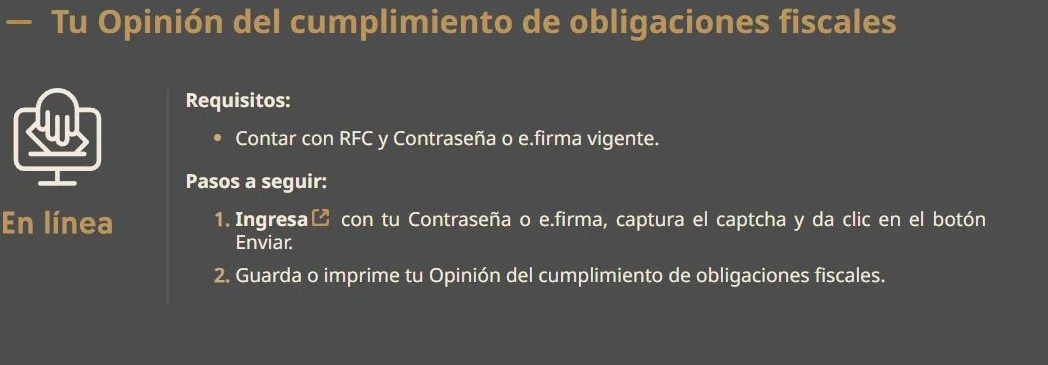

- Open Obtain your tax-compliance opinion.
- Sign in with RFC and Password or e.firma.
- Enter the security code requested by the service.
- Generate the document.
- Save the complete PDF and record its issue date.
- Verify the RFC, formal result and listed inconsistencies.
If the document does not appear after login, SAT advises refreshing the page. Do not share the Password, e.firma private key or private-key password with someone who only needs the PDF.
Four formal results in 2026
| Result | Meaning |
|---|---|
| Positive | The RFC is registered and current under the criteria reviewed by rule 2.1.36. |
| Negative | The RFC is registered, but at least one reviewed criterion is not current. |
| Suspended activities | The RFC is suspended on the issue date. |
| Registered without tax obligations | The RFC is registered with no tax obligations on record. |
*With observations* is not a formal result in the rule. A negative PDF may list specific inconsistencies by obligation and period.
What SAT reviews
The authority consults RFC records, returns, CFDI and other institutional databases. Applicable criteria include:
- active RFC registration;
- annual ISR returns for the last four fiscal years;
- provisional payments, withholding, final payments and DIOT for the current year and four prior years;
- consistency between returns, CFDI and information available to tax authorities;
- absence from the definitive article 69-B list;
- status of final or enforceable tax liabilities;
- taxpayer location status;
- absence of a final criminal conviction for a tax offense;
- absence from the article 69-B Bis list;
- beneficial-owner obligations when applicable;
- absence of a notified determination for issuing false tax receipts under article 49 Bis of the Federal Tax Code.
The rule contains additional criteria for particular taxpayers. The opinion does not replace a full review of accounting records or tax calculations.
Read a negative opinion by cause
| Inconsistency | Records to review |
|---|---|
| Missing return | Tax-status certificate, acknowledgments and monthly filing control. |
| Unmatched payment | Return acknowledgment, payment reference, bank receipt and statement. |
| Difference from CFDI | XML, cancellations, payment complements and workpaper. |
| Tax liability | Assessment, notification date, current status and guarantee, if any. |
| Inactive or unlocated RFC | Tax-status certificate, address and filed notices. |
| Article 69-B or 69-B Bis listing | Publication, determination and applicable procedure. |
Do not file a zero return to remove an inconsistency when actual transactions produce another result. Do not pay an amount until the RFC, obligation, period, concept and liability status have been confirmed.
Correction sequence

- Download the complete negative opinion.
- Record every obligation, period and stated cause.
- Compare each item with the tax-status certificate.
- Retrieve return acknowledgments, payment references and bank receipts.
- Reconcile amounts to CFDI, bank records and tax workpapers.
- Correct a genuine omission through the applicable return, payment or RFC procedure.
- If the obligation was already met or the record is wrong, prepare a documented clarification.
- Retain the correction or clarification acknowledgment.
- Request a new opinion after the inconsistency is resolved.
For example, if you never filed the return listed in the opinion, prepare and file that period. If you already filed it, compare the acknowledgment with the RFC, tax and period shown in the opinion. Matching records can support a clarification. Filing again simply to remove the warning may be unnecessary.
Clarification procedure
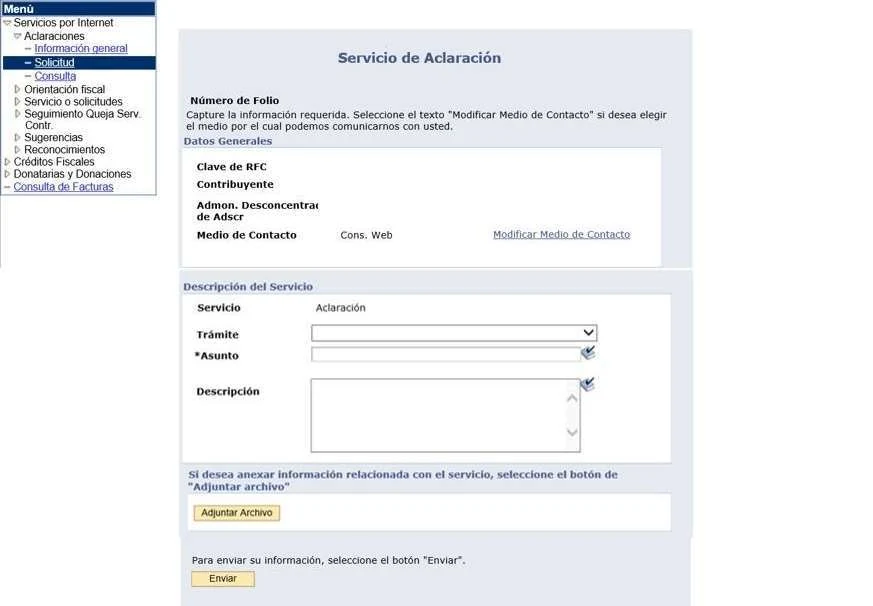
Rule 2.1.36 refers to procedure file 27/CFF in Anexo 2 of the 2026 resolution. The clarification is submitted through Mi portal with the negative opinion and supporting electronic files.
The SAT clarification service classifies cases by origin:
| Origin | Typical evidence |
|---|---|
| RFC status | Certificate, update notice and acknowledgment. |
| Returns | Return, acknowledgment, workpaper and payment. |
| Tax liabilities or guarantees | Assessment, receipts and filed guarantee. |
| Unlocated status | Address notice and evidence of the tax address. |
| Tax lists | Determination, publication and procedural records. |
The 2026 rule gives the authority up to six days to resolve the clarification categories enumerated there. After a favorable response, the taxpayer must request a new opinion. An unsuccessful clarification may be filed again with new reasons and additional documentary support.
Validity and use
The positive opinion under rule 2.1.36 is valid for 30 calendar days. Check the issue date before sending it to a customer, lender or government body.
Article 32-D of the Federal Tax Code uses the opinion in matters such as public contracts, subsidies, incentives and authorizations. Each procedure may add its own documentary requirements.
A taxpayer can authorize a third party to consult the result. SAT also provides a public query for an RFC or CURP whose holder authorized publication. No result means the holder did not provide a current public authorization; it does not establish noncompliance.
Keep the records together while you resolve the issue
| Folder | Content |
|---|---|
| `01-opinion` | Negative PDF and query date. |
| `02-rfc` | Tax-status certificate and update notices. |
| `03-returns` | Normal and amended returns with acknowledgments. |
| `04-payments` | Payment references, bank receipts and statements. |
| `05-support` | CFDI, reconciliations and tax workpapers. |
| `06-clarification` | Request, attachments, acknowledgment and response. |
| `07-result` | New opinion and closure record. |
Use these folder names or your own. Keep the original opinion, the documents you submitted and SAT's response as separate files so that a newer version does not overwrite an earlier one.
When specialist review is needed
Request tax or legal review when the negative opinion:
- affects a contract, subsidy, loan or tender with an approaching date;
- lists tax liabilities or guarantees;
- shows obligations outside the registered activity;
- covers several fiscal years or tax types;
- arises from unlocated status or a tax list;
- remains negative after a documented correction;
- requires an amended return whose calculation is not reconciled.
When asking for help, send the complete opinion through a secure channel and mention any deadline for providing it to a customer or institution. Include relevant acknowledgments and explain what you have already tried so the advisor can avoid repeating completed work.
Frequently asked questions
How long is a positive opinion valid in 2026?
Thirty calendar days from its issue date under rule 2.1.36.
Does a positive opinion confirm that taxes were calculated correctly?
No. It reflects information available in SAT systems and is not a ruling on tax calculations or amounts declared or paid.
What should I do with a negative result?
Identify the criterion, obligation and period. Correct a genuine omission. If the record is wrong or the obligation was already met, submit a clarification with evidence.
Must I request another opinion after clarification?
Yes. Rule 2.1.36 instructs the taxpayer to request a new opinion after the inconsistency is resolved.
Does no public-query result mean the opinion is negative?
No. It may mean the taxpayer did not authorize SAT to publish the result.
Use the guide on checking SAT monthly tax returns to retrieve related filing and payment evidence.
Official sources
- SAT: obtain your tax-compliance opinion.
- SAT: clarify opinion inconsistencies.
- SAT: public opinion query.
- SAT: 2026 Miscellaneous Tax Resolution, rule 2.1.36.
- Chamber of Deputies: Federal Tax Code.
Official links to complete the task
Open official services from a new browser tab, confirm the taxpayer and period, and save the resulting acknowledgment or evidence with the case.