
If you receive an email claiming to be from the SAT, don't ignore it, but also don't reply, download files, or provide data from that message. The safe approach is to stay calm, check for authenticity signs, and log in yourself at sat.gob.mx to confirm if there is a real notification, request, or message in your Tax Mailbox.
Do not act from the email itself
Do not open attachments, share credentials or sign in through the message link. Open a new browser tab, enter the official SAT site yourself and check the Tax Mailbox and the authority's published verification channels. If the communication is real, save the official document and stated deadline before assigning the response.
Publicación de InstagramMostrarOcultar
Original Fintax video: what to do if you get an email from the SAT.
The Main Rule
The email is a notice for you to verify; it is not, by itself, definitive proof of a fine, audit, or debt. The evidence you must check is within the SAT's official channels.
What an Email from the SAT Really Means
The Tax Mailbox is the electronic channel through which the SAT can send important messages and notify administrative acts or resolutions. Registered email and SMS serve as alert mechanisms: they inform you that something is pending review, but the content that determines what is happening must be checked inside the Mailbox.
| What You Receive | What It Could Mean | What to Do |
|---|---|---|
| Email or SMS Notice | There is pending information in the Tax Mailbox. | Go directly to sat.gob.mx and check the Mailbox. |
| Message of Interest | Guidance, invitation, or useful information for compliance. | Read it, identify if any action is requested, and keep evidence if applicable. |
| Electronic Notification | An administrative act or resolution available for review. | Open it in the Mailbox, download it, and record the date and deadline. |
| Email Without Support in the Mailbox | Could be advertising, error, impersonation, or phishing. | Do not reply; verify in the fake email search tool and through official channels. |
The 3 Video Steps to Verify an Email from the SAT
1. Don't Panic or Act Impulsively
An urgent subject, a word like “debt,” or a design that mimics the SAT do not prove a sanction exists. Before concluding it is an audit, separate the notice from the fact: first confirm if there is a real document inside the Tax Mailbox and what type it is.
- Do not reply to the message while evaluating it.
- Do not open executable files, compressed files, or unexpected documents.
- Do not pay capture lines or transfer money from links received by email.
- Take a screenshot or keep the original message without forwarding it unnecessarily to others.
2. Check the Message's Authenticity
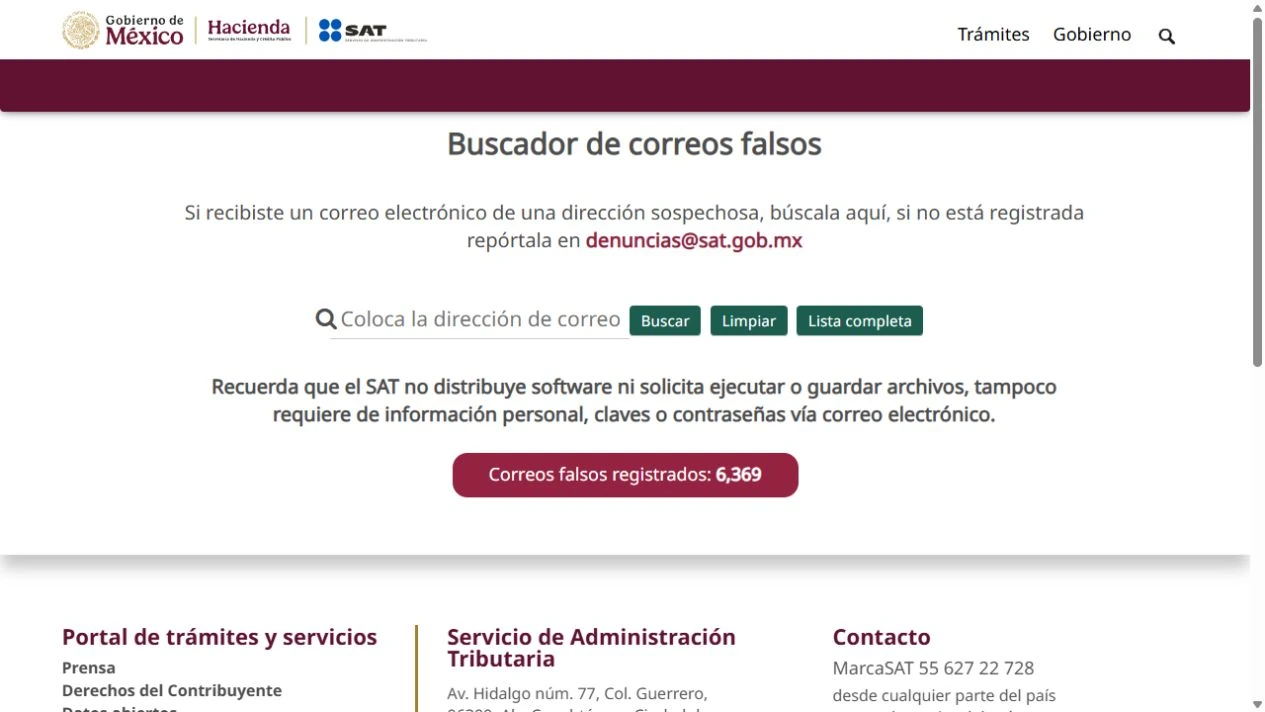
The SAT has a Fake Email Search Tool and warns that it does not distribute software nor request executing or saving files, personal data, passwords, or keys by email. Even if the sender and design look correct, an address can be visually forged; therefore, the sender should never be your only validation.
- Check the full sender address, not just the displayed name.
- Hover over links without clicking to detect domains other than sat.gob.mx.
- Be suspicious of requests for passwords, e.firma, .key files, SMS codes, or bank data.
- Verify the supposed sender in the official fake email search tool.
- Confirm that any phone number or help channel comes from the official portal.
3. Confirm Everything Inside the Tax Mailbox
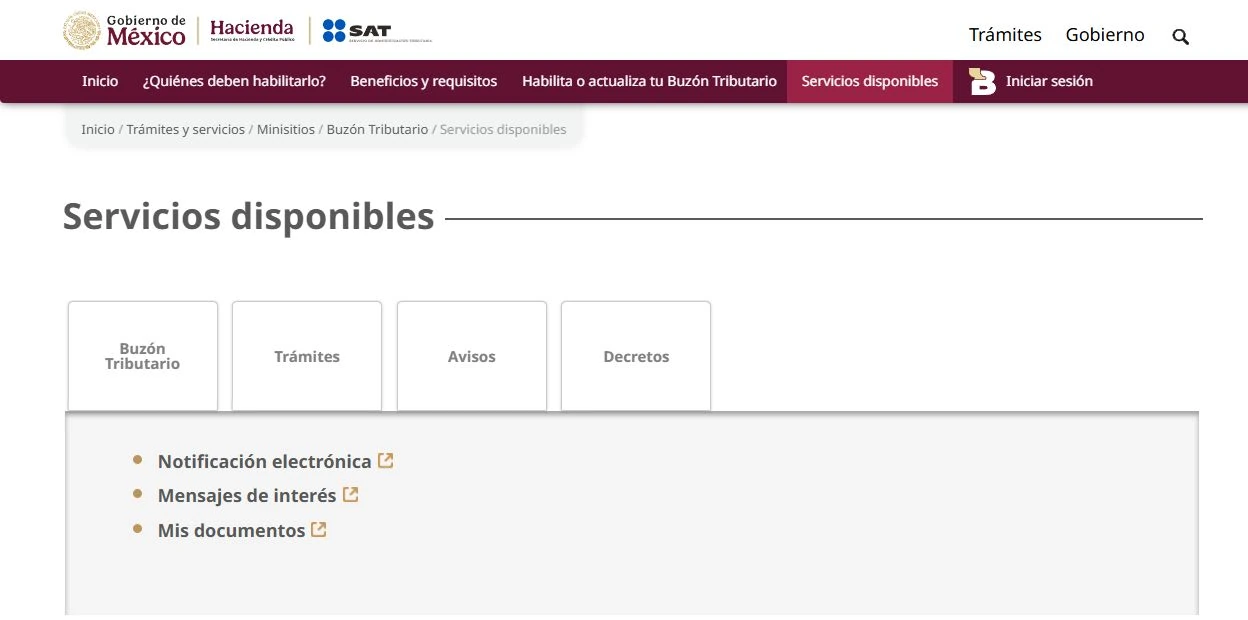
Open a new browser window, type sat.gob.mx, and log in to the Tax Mailbox with your current access. Check the Pending and Notified folders, as well as “My Communications” for messages of interest. Do not use the email button as a shortcut for this verification.
Article 17-K of the Federal Fiscal Code states that those assigned a Tax Mailbox must consult it within three days following receipt of the electronic notice. Therefore, “don’t panic” does not mean delay: verify promptly and document what you find.
Safe Verification Path in 10 Minutes
- Keep the email without replying and note the time you received it.
- Open sat.gob.mx by typing the address or using a validated bookmark.
- Log in to the Tax Mailbox and check Pending, Notified, and My Communications.
- Compare RFC, period, obligation, official document number, and date against your tax information.
- Download the document and acknowledgment only from the Mailbox when there is a real act.
- Record notification date, deadline, responsible person, and next action in your tax control.
- If nothing appears, check the fake email search tool and request guidance through official channels.
How to Classify What You Find
| Finding | Priority | Next Action |
|---|---|---|
| Administrative act or request with deadline | High | Download document and acknowledgment, calculate due date, and request professional review the same day. |
| Invitation or message of interest | Medium | Read the scope, compare data, and decide if correction or response is needed. |
| Notice of an obligation you have already fulfilled | Medium | Gather declaration, payment, and acknowledgment before clarifying. |
| No related message exists | Preventive | Do not interact with the email; keep evidence and verify possible impersonation. |
| You cannot access the Mailbox | High | Recover access through the official portal without sharing credentials with third parties. |
A Deadline Changes the Priority
If a formal notification appears in the Mailbox, do not calculate the deadline only by the email date. Check the date and acknowledgment of the act, and seek professional support if you do not understand the scope.
Common Signs of Phishing or Impersonation
- The visible link says SAT, but the actual domain is different from sat.gob.mx.
- The message demands a transfer, purchase of cards, or immediate payment to a personal account.
- Requests Password, e.firma, .key file, SMS code, or bank information in reply.
- Includes an executable file, compressed file, or supposed software update.
- Threatens immediate consequences and prevents you from checking the Tax Mailbox.
- Uses writing errors, generic tax data, or an RFC that does not match you.
What Evidence Is Worth Keeping
- Original email with headers, sender, date, and subject.
- Screenshot of the message without exposing passwords or sensitive data.
- Document and acknowledgment downloaded from the Tax Mailbox, if any.
- Date of consultation and Mailbox section where the notice appeared.
- Declarations, payments, or acknowledgments related to the indicated period.
- Internal record of responsible person, deadline, and agreed action.
Mistakes to Avoid
- Deleting the email out of fear without checking the Tax Mailbox.
- Clicking because the logo, colors, or name look official.
- Forwarding suspicious files to the entire team and increasing risk.
- Replying with RFC, password, tax certificate, or bank data.
- Confusing a message of interest with a formal notification, or vice versa.
- Waiting for the accountant without recording when the notice was received and opened.
Frequently Asked Questions
Can the SAT notify me by email?
Yes. The registered email can be used to notify you that there is pending information in your Tax Mailbox (Buzón Tributario). Verification and review of the content must be done through the official channel.
Does an email from the SAT mean I have an audit or fine?
Not necessarily. It could be an informational message, an invitation, a notice, or a formal notification. Only after accessing the Mailbox and reading the document can you properly classify it.
Can I ignore it if it seems fake?
It is not advisable to ignore it without verifying. Go directly to sat.gob.mx, check your Mailbox, and then validate the sender in the official fake email search tool. This way you avoid both falling for phishing and overlooking a real communication.
Does the SAT ask for passwords or e.firma files by email?
The SAT states that it does not request personal information, passwords, or keys by email. Do not share your Password, .key file, e.firma, authentication codes, or bank details through that channel.
What should I do if there is a real notification I don't understand?
Download the document and the acknowledgment from the Mailbox, identify the period, obligation, and deadline, and request a professional review. Avoid responding with an improvised clarification before gathering declarations, payments, and evidence.
Official sources for validation
- Official SAT Tax Mailbox (Buzón Tributario) microsite.
- Official SAT fake email search tool.
- Article 17-K of the Federal Fiscal Code (Código Fiscal de la Federación).
How Fintax can help
Fintax can help you classify the communication, review the document within the Tax Mailbox, reconstruct acknowledgments and related payments, and prepare a response with evidence. If you received a notice and don't know if it is informational, urgent, or fake, share the context through a secure channel—never your passwords or e.firma files.
Official links to complete the task
Open official services from a new browser tab, confirm the taxpayer and period, and save the resulting acknowledgment or evidence with the case.