
Quick Answer
To obtain your e.firma for the first time, you must schedule an appointment for the e.firma service for individuals, go to the SAT module with valid official identification, proof of address, and a USB drive—preferably new—and complete biometric validation. The procedure is free. Check the current 105/CFF form before attending, as accepted documents depend on your situation.
The e.firma is not just a SAT password. It is a digital certificate with effects equivalent to a handwritten signature and is used for declarations, refunds, clarifications, certificates, and other procedures. Proper preparation for the first appointment avoids returning with incorrect documents and, above all, prevents losing the files you will receive.
The short answer before booking
A first e.firma requires an in-person SAT appointment and the current documents listed in the official service page. Confirm the office, appointment service and requirements before traveling. When the process is complete, keep separate backups of the .cer certificate, .key private key and private-key password; SAT cannot recover that password for you.
Publicación de InstagramMostrarOcultar
Original Fintax video: basic requirements to obtain or recover access to your e.firma.
Don't confuse recovering with reissuing
The SAT allows you to download the public certificate .cer again, but it does not store your private key .key nor know its password. If you lost the .key or its password, the solution may be a renewal or in-person service, not a simple download.
What procedure do you really need?
| Situation | Correct path | What you must confirm |
|---|---|---|
| You have never had an e.firma | First-time generation, in person and by appointment. | Form 105/CFF, identity, address, CURP, and USB. |
| Your e.firma is still valid | Use it or renew it before expiration. | That you keep the .cer, .key, and private key password. |
| You only lost the .cer file | Download the public certificate from the recovery system. | RFC or certificate serial number. |
| You lost the .key or its password | Check renewal or visit the SAT, depending on validity and situation. | There is no download for the lost private key. |
| You suspect misuse | Consider revocation and generating a new certificate. | Act promptly and keep the revocation receipt. |
Requirements to obtain the e.firma for the first time
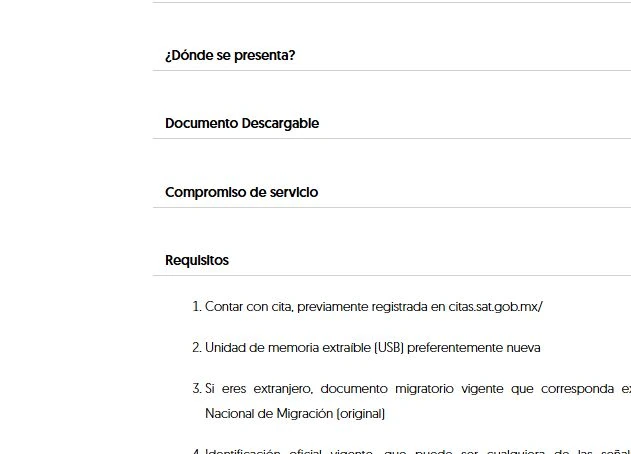
The official form to obtain the e.firma certificate states that the procedure is free and must be done at a SAT office offering the service, by appointment. The authority records photograph, fingerprints, iris scan, handwritten signature, and identity documents to link the certificate to its holder.
- Confirmed appointment on the official SAT appointment portal for the correct service.
- Original, valid official identification accepted by the applicable Annex 1-A.
- Original proof of address accepted; verify it matches your RFC situation.
- Valid CURP consistent with your identity data.
- Removable USB memory unit, preferably new and without unrelated files.
- Current email address to which you have access.
- Valid immigration document if you are a foreign individual.
Do not use a forwarded checklist as your final source. Open the official form the day before your appointment: valid documents, representation cases, and special requirements may change or depend on whether you are a minor, foreigner, executor, or have admitted legal representation.
Step by step: before, during, and after the appointment
- Confirm that your name, CURP, RFC, and address have no discrepancies that could block validation.
- Schedule the exact e.firma service for individuals and save the appointment confirmation.
- Prepare originals and USB; do not submit a memory device with unnecessary personal files.
- Arrive early and answer questions about your identity and tax situation accurately.
- Review the data before signing the application and generation receipt.
- At the end, confirm you keep the .cer certificate, the private key .key, and the generation receipt.
- Create two encrypted and separate backups; test the password without sharing it with others.
- Record the expiration date: the e.firma is valid for four years.
The e.firma files and what each one is for
| Element | Function | Can it be recovered? | Recommended control |
|---|---|---|---|
| Certificate .cer | Publicly identifies the holder and the certificate's validity. | Yes, it can be downloaded from the SAT public system. | Keep a copy and the serial number. |
| Private key .key | Allows generating the signature along with its password. | No; the SAT does not store your private key. | Encrypted backup with limited access. |
| Private key password | Unlocks the .key file to sign. | The SAT does not know or recover its content. | Secure manager; never email or chat. |
| Generation receipt | Proves the procedure was completed. | Do not assume it will always be available in another system. | Keep with date, RFC, and responsible party. |
If you lost files: what you can do
The certificate recovery system allows downloading the .cer file using the RFC or serial number. This does not reconstruct a lost .key. If you still have the private key and its password, check the official e.firma renewal path; if any element is missing or validity exceeds online limits, prepare for in-person service.
- Losing the .cer does not mean losing the private key: download the corresponding certificate and verify it matches your .key.
- Losing the .key or its password prevents using that identity to sign; do not try services that promise to “decrypt” it.
- If the device was stolen or someone could copy the files, consider revoking the certificate and document the incident.
- If the SAT issues a request for additional information, respond to the indicated clarification; do not schedule repeated appointments without resolving the cause.
How to store your e.firma without turning it into a risk
- Do not send .cer, .key, and password together by email, WhatsApp, or unverified forms.
- Keep at least two encrypted backups in separate locations.
- Limit who can use it and record for which procedure it was used.
- Separate personal e.firma from Digital Seal Certificates used for invoicing.
- Revoke access and update responsible parties when the accountant or collaborator changes.
- Set alerts 120, 60, and 30 days before expiration.
The e.firma is not handed over to the accountant as if it were an administrative file: each use produces legal effects and must be authorized.
— Fintax
Frequently Asked Questions
Can I obtain the e.firma completely online?
First-time generation for an individual requires in-person service with appointment and biometric capture. Some renewals have online paths but do not replace the initial procedure.
How much does it cost to obtain the e.firma?
The procedure before the SAT is free. Be wary of anyone charging to “release” an appointment or guaranteeing preferential access; private advice may charge for preparation or accompaniment, but not for the right to the procedure.
Can I recover my .key file from the SAT?
No. The SAT publishes and allows downloading the .cer certificate but does not store the private key .key nor know the password that protects it.
Are the e.firma and the CSD the same?
No. The e.firma identifies the taxpayer for multiple procedures; the Digital Seal Certificate (CSD) is used to seal CFDI (digital tax receipts). They must be stored and managed separately.
Official sources and related readings
- SAT: get your e.firma certificate for the first time.
- SAT: direct download of the .cer certificate.
- SAT: renewal of your e.firma certificate.
- Fintax: how to renew your e.firma before expiration.
- Fintax: difference and renewal of the Digital Seal Certificate.
How Fintax can help you
Fintax can help you identify if you need generation, recovery of the .cer, renewal or revocation; review your file before the appointment; and design a secure backup so your procedures don’t depend on a single USB drive or an external person.
Official links to complete the task
Open official services from a new browser tab, confirm the taxpayer and period, and save the resulting acknowledgment or evidence with the case.