

Responding to a SAT document request requires an evidence-backed deadline, rather than a count starting when you noticed the email. The alert, formal notification, effective date and first day of the response period serve different purposes. Before marking the deadline, identify what the authority is requesting and which provision sets the period: Article 53 of Mexico's Federal Tax Code (CFF) does not apply to every request. CFF, Articles 17-K, 53, 134 and 135.
Four dates to keep separate
Publicación de InstagramMostrarOcultar
Original Fintax Instagram publication about counting the response period for a SAT document request.
For electronic notifications, the alert tells you that a document is waiting. Authentication and opening the document generate an acknowledgment recording the notification date and time. Under Article 135, notification takes effect on the next business day, not simply the next calendar day. For Article 53(b) and (c), the response period runs from the day after the notification takes effect. CFF, Articles 134, 135 and 53.
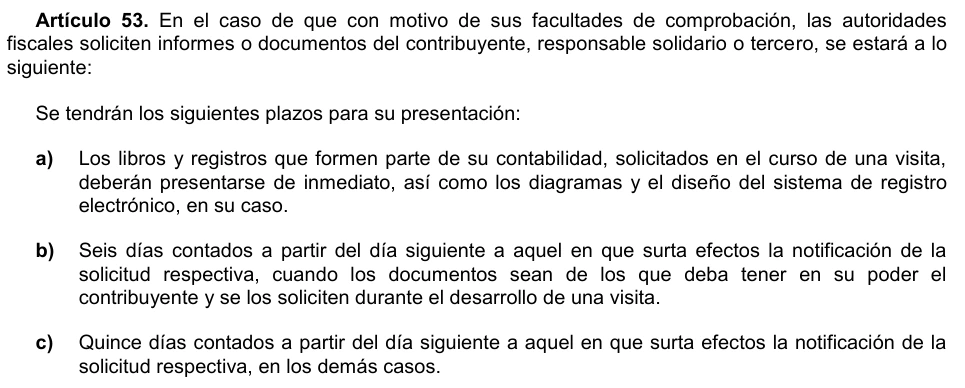
- Article 53(a): immediate delivery of books and records requested during an inspection visit.
- Article 53(b): six days for documents the taxpayer must have in their possession and that are requested during an inspection visit.
- Article 53(c): fifteen days in the other cases covered by that article.
These distinctions rule out a universal six-to-fifteen-day response period for every SAT request. The correct category depends on the specific action taken by the authority. CFF, Article 53.
Example: fifteen days starting on October 8
Assume a document request made under the authority's verification powers falls within Article 53(c). The alert arrives on Monday, October 5, 2026, and the document is opened on Tuesday, October 6 at noon, central Mexico time, during business hours, as recorded in the acknowledgment. Assume no additional non-working days, vacation periods, suspensions or officially authorized working days alter this case. Under those conditions, the calendar is as follows. CFF, Articles 12, 13, 53, 134 and 135.
| Stage | Date in 2026 | Meaning |
|---|---|---|
| Alert | Monday, October 5 | Document waiting; the response period has not started |
| Notification | Tuesday, October 6, noon | Date and time recorded in the acknowledgment |
| Effective date | Wednesday, October 7 | Business day following notification |
| First counted day | Thursday, October 8 | Day after the effective date |
| Last counted day | Wednesday, October 28 | Day 15 under the example's conditions |
The fifteen counted dates are October 8, 9, 12, 13, 14, 15, 16, 19, 20, 21, 22, 23, 26, 27 and 28. The weekends of October 10 and 11, 17 and 18, and 24 and 25 are excluded. October 12 is not a non-working day listed in Article 12. CFF, Article 12.
Rule 2.1.6 in the compilation consulted does not designate non-working days from October 8 through 28. Before applying this result to an actual case, check updates and any days the authority has officially authorized as working days. The example's calendar does not replace that review. SAT, Rule 2.1.6.
Controls that support your calculation

The rules above determine the legal calculation. The following steps are recommended controls to prevent operational mistakes:
- Save the complete request and notification acknowledgment. Identify the issuing authority, originating unit, action, article, subsection and response period. Do not start counting from an internally forwarded email.
- Build a calendar showing notification, effective date, first day, excluded dates and deadline. Record the source for each exclusion and arrange a second review.
- If the request and its legal basis appear inconsistent, obtain a case-specific assessment promptly. Do not resolve the discrepancy by assuming a different response period yourself.
- For this example, set October 26 as your internal target. This is a recommended working buffer, not a change to the legal deadline.
- Prepare an index of documents, requested periods, accepted format and specified submission channel. Keep the final submission acknowledgment, rather than just the draft. Do not share passwords.
Frequently asked questions
What happens if I do not open the document?
There are three days to open it, starting the day after the alert. If it remains unopened, notification is deemed completed on the fourth day. In this example, the three days would be October 6, 7 and 8: notification would occur on Friday, October 9 and take effect on Monday, October 12. Opening it later does not restart notification. CFF, Articles 134 and 135.
Does opening it on a non-working day change the date?
Yes. SAT states that when a document is opened on a non-working day, notification is deemed completed at 9:30 a.m., central Mexico time, on the next business day. Verify that date before calculating when notification takes effect. SAT, electronic notification questions.
Does requesting an extension automatically add days?
No. Article 53 allows the authority to extend the periods under subsections (b) and (c) by ten days when the information is difficult to obtain or provide. This is discretionary: submitting a request does not mean an extension has been granted. CFF, Article 53.