

A negative Compliance Opinion is not corrected by downloading the document again or submitting a generic clarification. First, you must read what inconsistency the SAT reports, fix the actual obligation, and keep the receipts that prove what was done.
Fix the underlying period before filing a clarification
Break the negative opinion into obligation, period, filing, payment and current status. Correct or pay only after confirming the observation against acknowledgments and bank evidence, then allow the official record to update. If the item remains, submit a clarification with the opinion, receipts, payment proof and a concise period-by-period explanation.
Publicación de InstagramMostrarOcultar
Original Fintax video: how to correct a negative Compliance Opinion due to pending returns or payments.
The main idea of the video
If the opinion is negative due to omitted returns, file the ones that actually apply to you; if they generate a balance due, pay it and wait 72 hours before concluding that the SAT has not updated the information.
The Compliance Opinion allows you to check if the SAT considers you up to date according to article 32-D of the CFF. For 2026, forms 26/CFF and 27/CFF of the Annex 2 of the RMF detail how to obtain it, how to clarify it, and the update period after submitting returns or payments.
Quick answer: the 2 steps from the reel
- File the returns that the opinion marks as omitted, after confirming the obligation, period, and type of return.
- If there is a balance due, make the payment with the correct payment slip and wait 72 hours before generating the opinion again.
These two steps apply when the cause is a pending return or payment. If the opinion indicates another inconsistency — RFC, address, tax credit, listings, or an obligation that does not correspond to you — the solution changes and may require a specific clarification.
Before correcting: identify the exact cause
| Inconsistency | What to check first | Useful evidence |
|---|---|---|
| Omitted return | Obligation, period, regime, and whether a receipt already exists. | Filed return, receipt, and working papers. |
| Unrecognized payment | Payment slip, date, amount, bank, and reference. | Return receipt and bank proof. |
| RFC status | Active status, activities, obligations, and address. | Certificate, update notices, and receipts. |
| Tax credit | Resolution, payment, agreement, guarantee, or legal remedy. | Resolution and support of the credit status. |
| Not located or other case | Literal text of the opinion and related background. | Negative opinion and documents that address the issue. |
Don’t file reflexively
That an obligation appears as omitted is not enough reason to file a return. First confirm that it corresponds to your regime, period, and tax situation; if the SAT’s data is incorrect, prepare a clarification with supporting evidence.
Step 1. File the returns that are actually omitted
Cross-check the inconsistency against your registered obligations, files, and receipts. If the return is indeed missing, file it with the correct information. If you get a balance due, the regularization does not end with submission: you must pay it at an authorized bank so that the return is considered filed with the corresponding payment.
- Download the negative opinion and save the consultation date.
- Note the tax, obligation, period, and fiscal year that appear as omitted.
- Compare against the Tax Situation Certificate, returns, and receipts.
- Prepare the return with working papers and reconciled data.
- Save the filing receipt, payment slip, and submitted files.
Step 2. Pay the balance due and wait 72 hours
When the return shows tax due, pay the correct payment slip and keep the bank receipt. Form 27/CFF for 2026 indicates that after fulfilling the omitted obligations, 72 hours must pass from the filing of the return or the corresponding payment for the Compliance Opinion to update.
- Verify that RFC, amount, reference, and payment date match the payment slip.
- Count 72 hours from the applicable event, without drawing conclusions every few minutes.
- Obtain a new opinion and compare it with the previous one by obligation and period.
- If it has changed to positive, save the new document along with receipts and payment.
- If it remains negative, determine if processing is pending or if the inconsistency requires clarification.
When to submit a clarification
The clarification procedure is for individuals or entities who disagree with the result and have documents to support it. It does not replace the return or payment that is actually missing: it serves to demonstrate why the opinion should be corrected when the information has already been fixed or the issue does not correspond.
- 72 hours have passed and the return or payment is not reflected.
- The reported obligation does not correspond to your regime or the indicated period.
- The SAT marks a problem with RFC or address that has already been updated.
- The tax credit is paid, guaranteed, or has a status that the opinion does not recognize.
- The result includes another inconsistency for which you have documentary support.
Clarification path in Mi Portal
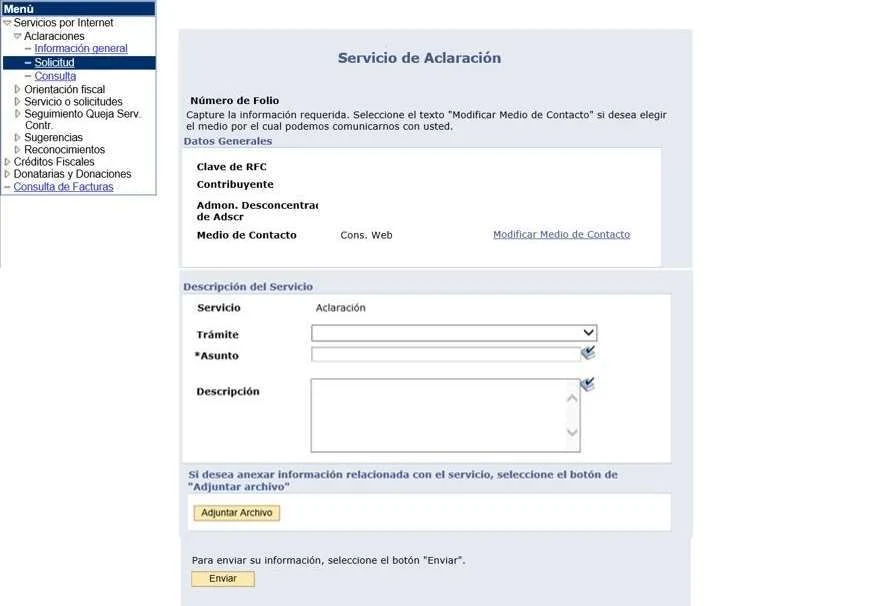
- Log in directly to SAT’s Mi Portal with RFC and password.
- Open Internet Services, then Clarifications, and finally Request.
- Choose the label that corresponds to the inconsistency; a wrong label can delay assignment.
- Describe facts, obligation, period, filing and payment dates, and why you disagree.
- Attach the negative opinion and documents that address each point in PDF.
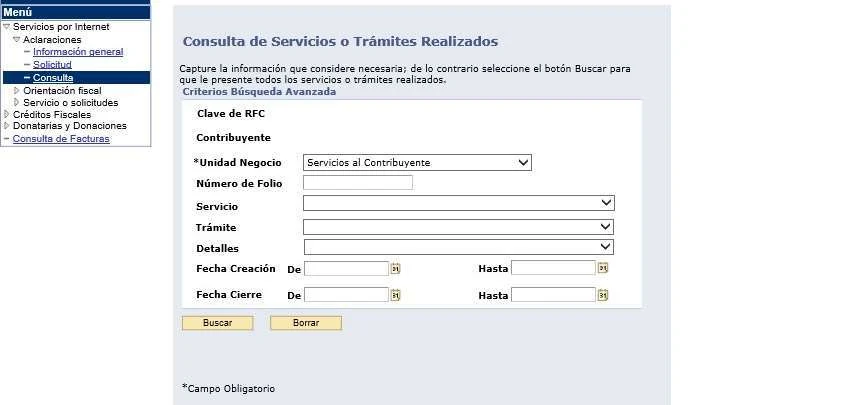
- Submit, download the receipt with folio, and track it under Clarifications / Consultation.
| Case type | Label indicated in form 27/CFF 2026 |
|---|---|
| RFC registry status | RFC OPINIÓN DEL CUMPL |
| Tax credits or guarantees | CRÉDITOS (OPINIÓN DEL CUMPLIM) |
| Returns, 69-B, 69-B Bis, tax ruling or not located | ACLARA OPINION DE CUMPLIMIENTO |
Minimum file for the clarification to be understandable
- Complete negative opinion, not just a cropped screenshot.
- Receipt of the return linked to the inconsistency.
- Bank proof and payment slip when there was a balance due.
- Certificate or RFC notices when the difference is registry-related.
- Brief explanation linking each attachment with obligation, period, and date.
- Folio and receipt of the clarification to check the response.
Deadlines and documents you should keep track of
| Moment | What to expect | What to keep |
|---|---|---|
| When obtaining the opinion | Immediate online result. | Complete PDF and issue date. |
| After filing or paying | Up to 72 hours for update due to omitted obligations. | Receipt, payment slip, and payment. |
| When submitting clarification | Immediate receipt with folio. | Request, attachments, and receipt. |
| Clarification resolution | Form 27/CFF indicates a maximum term of six days. | Approved or denied response and corrected opinion when applicable. |
Errors That Delay the Correction
- Re-downloading the opinion before 72 hours have passed and assuming nothing worked.
- Filing an incorrect return just to remove a flag.
- Paying with an expired, incorrect, or different reference than the acknowledgment.
- Submitting a clarification without a negative opinion, acknowledgments, or bank receipt.
- Selecting a generic label that does not correspond to the type of inconsistency.
- Losing the folio number and not checking the response within Mi Portal.
A negative opinion is corrected with traceability: identified cause, obligation remedied, deadline respected, and sufficient evidence to clarify what still does not match.
— Fintax
Frequently Asked Questions
Should I submit a clarification immediately?
Not necessarily. If the opinion reports missing declarations or payments, first remedy them and wait 72 hours. Submit a clarification when the data is incorrect or when a correction already made is not reflected after that period.
Does a positive opinion last forever?
No. Form 26/CFF 2026 specifies specific validity periods depending on the use: three months for subsidies or incentives and 30 calendar days for tax procedures or authorizations related to domestic taxes and foreign trade, as long as the opinion is positive.
Is a payment screenshot enough?
It is advisable to keep the complete bank receipt, the payment reference line, and the declaration acknowledgment. Together, they allow linking the RFC, obligation, period, amount, reference, and date.
How Fintax Can Help
Fintax can review your Compliance Opinion, confirm which obligation causes the inconsistency, organize declarations and payments, and prepare the clarification file. The goal is to correct the cause without submitting unnecessary information or losing track.
Official links to complete the task
Open official services from a new browser tab, confirm the taxpayer and period, and save the resulting acknowledgment or evidence with the case.