

Someone has asked you to correct an invoice. Should you cancel it, replace it or issue a payment complement? Start by identifying the problem. An incorrect postal code needs a different review from a credit invoice that your customer has just paid.
Choose the remedy from the transaction, not the portal
Before canceling or replacing a CFDI, write down what happened commercially: whether the operation existed, whether the amount or recipient was wrong, whether payment was received and which document must remain linked. That sequence prevents a technically valid cancellation from creating a new mismatch in accounting or collections.
Find the XML and check whether the CFDI is still active in SAT's records. Then confirm whether the transaction has been paid, entered in your accounts or included in a tax return. Those details help you identify which records may also need updating when you correct the invoice.
What to review before changing the CFDI
Validate the XML and its status with SAT. Then locate the incorrect field, confirm the payment date and form, check for related CFDI and determine whether the receipt has already affected a return. This separates cases that need documentation, a payment complement or a replacement.
| Issue found | Initial review |
|---|---|
| Incorrect mandatory receiver data | Compare the XML with the tax status certificate and determine whether replacement is required |
| PPD invoice already collected | Verify date, amount, balance and payment complement |
| Canceled CFDI recorded as active | Reverse the entry and keep the cancellation acknowledgment |
| Difference with bank activity or a return | Reconcile before filing a correction |
First confirm that the CFDI exists and is active
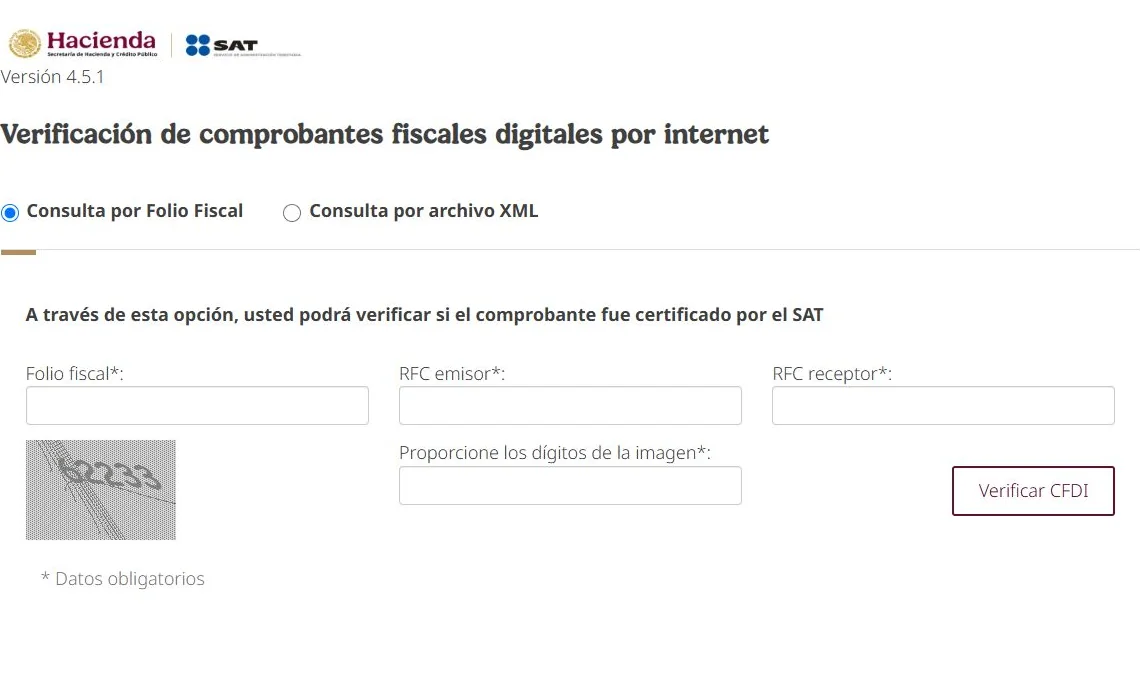
First confirm that you are looking at the correct tax receipt. SAT's tool to verify electronic invoices checks the status using the fiscal folio and the issuer and receiver RFC, without a login.
Do not work from the PDF alone. The stamped XML is the tax receipt. The PDF makes the invoice easier to read, but it does not prove that the CFDI is active or that it matches the fiscal file.
If the CFDI does not appear in SAT records, do not use it to support a deduction, VAT credit or reconciliation. First request the correct XML, check whether it was canceled or confirm whether the supplier actually stamped the transaction.
Identify the field that failed
In CFDI 4.0, the RFC, legal name, fiscal ZIP code, tax regime and CFDI use must be consistent. SAT summarizes the mandatory fields in its infographic on receiver data in CFDI 4.0.
Separate the issue before choosing the fix:
- Incorrect receiver tax data.
- CFDI use that does not match the receiver's tax regime.
- Wrong payment method: PUE when payment was actually deferred, or PPD with no follow-up.
- Payment form that does not match bank evidence.
- Taxes, withholdings or transferred taxes entered differently from the transaction.
- Canceled, replaced or duplicated CFDI with no clear relationship.
Article 29-A of the Federal Tax Code states that amounts supported by receipts that fail the requirements, or whose data does not follow the tax rules, may not be deducted or credited. An internal note does not correct a mandatory field in the XML.
Decide whether to correct, complement or document
Not every issue is solved by canceling. First classify the case.
| Situation | Likely next step | Minimum evidence |
|---|---|---|
| The CFDI has incorrect receiver tax data | Issue the replacement and cancel the original, if applicable | Tax status certificate, original XML, new UUID and cancellation acknowledgment |
| The invoice was PPD and has already been paid | Issue or request the payment complement | Bank statement, payment date, related UUID and balance |
| Payment was made in the same month and PUE is correct | Document and reconcile | Proof of payment, XML, accounting entry or register |
| The CFDI is canceled but was booked as active | Reverse the entry and request support | SAT status, cancellation acknowledgment and supplier communication |
| Bank, CFDI and return do not match | Reconcile before filing or correcting | Ledger, bank statements, issued/received CFDI and acknowledgments |
Keep the reason and acknowledgment for each cancellation. For a replacement, retain both XML files and identify each invoice's fiscal folio, or UUID. For a payment complement, check the amount, date, installment number and balance against the bank statement. These records will help you explain the correction if your customer or accountant reviews it later.
When the payment complement matters
The payment complement records when and how an invoice issued for deferred or installment payment was collected. SAT publishes operating guidance and frequently asked questions on its payment complement page.
Compare the payment method with what happened in the bank:
- For a PPD invoice, the issuer must generate a payment CFDI for amounts collected.
- For installments, each complement should identify the installment number, previous balance, amount paid and remaining balance.
- When PUE is used under the option in rule 2.7.1.39, full payment must arrive by the final day of the month in which the invoice was issued.
- If full payment does not arrive within that month, the 2026 Miscellaneous Tax Resolution requires cancellation and a new invoice using PPD, plus the applicable payment complements.
A collected PPD invoice without its complement leaves the payment date, amount and balance undocumented. That gap can affect reconciliations and reviews of prefilled returns.
If you cancel, do it with reason and support
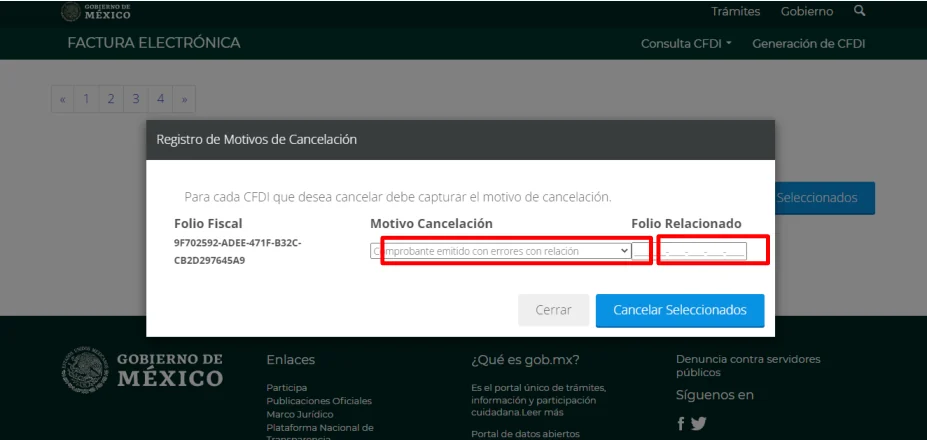
Every cancellation request needs a reason code. When the transaction remains valid and a corrected invoice replaces the original, SAT instructs the issuer to create the replacement first and then request cancellation of the original using reason 01 and the replacement fiscal folio. SAT's cancellation guidance also explains when receiver acceptance is required.
Before sending the request, review:
- Whether the receiver has already used the receipt.
- Whether the transaction remains valid and requires a replacement CFDI.
- Which reason code describes the actual cancellation.
- Whether receiver acceptance is required and when the response period ends.
Article 29-A also requires documentary support for canceling an income CFDI. Check the effect on returns, payment complements and accounting entries before sending the request.
Documents to include with a correction request
Before asking the client, supplier or accountant to do anything, collect:
- Active XML and PDF, if available.
- SAT verification result.
- Receiver tax status certificate when the issue is tax data.
- Bank statement or proof of payment.
- Contract, purchase order, quote or transaction evidence.
- Cancellation acknowledgment, if already canceled.
- Replacement CFDI UUID, if applicable.
- Return or acknowledgment where the CFDI may already have had an effect.
In your request, identify the incorrect field and the value that should replace it. Include the fiscal folio so the recipient can locate the right invoice. If you already used the receipt in a return, also tell your accountant so they can review the effect of the change.
Monthly control for businesses and individuals
An incorrect CFDI can affect creditable VAT, deductions, prefilled income, withholdings and accounts receivable. The cost grows when the same error appears in many receipts or carries into a return.
Include four tasks in the monthly close: validate material CFDI, reconcile collections against XML, review cancellations and store acknowledgments by period. The Fintax accounting service adds that evidence to the monthly file and return preparation.
Frequently asked questions
What should I do if a CFDI 4.0 has the wrong receiver ZIP code?
If a mandatory tax field does not match the receiver's tax status certificate, review whether cancellation and replacement apply. Keep the certificate, original XML, cancellation acknowledgment and related new CFDI.
Can I deduct an invoice that does not appear in SAT verification?
Do not use it as tax support until its status is clear. Request the correct stamped XML or confirm whether it was canceled, replaced or never stamped.
When do I need a payment complement?
When an invoice was issued using PPD and the issuer receives full payment or an installment. The complement should identify the related CFDI and match the payment date, amount and balance.
Is cancellation always the best correction?
No. The case may require a replacement, a payment complement or a reconciliation without changing the XML. The answer depends on the incorrect field, CFDI status, payment and effect on returns.
Official links to complete the task
Open official services from a new browser tab, confirm the taxpayer and period, and save the resulting acknowledgment or evidence with the case.